2016年11月18日 星期五

控制人物原地旋轉並移動


using UnityEngine;
using System.Collections;

public class TransformFunctions : MonoBehaviour
{
public float moveSpeed = 10f;
public float turnSpeed = 50f;


void Update ()
{
if(Input.GetKey(KeyCode.UpArrow))
transform.Translate(Vector3.forward * moveSpeed * Time.deltaTime);

if(Input.GetKey(KeyCode.DownArrow))
transform.Translate(-Vector3.forward * moveSpeed * Time.deltaTime);

if(Input.GetKey(KeyCode.LeftArrow))
transform.Rotate(Vector3.up, -turnSpeed * Time.deltaTime);

if(Input.GetKey(KeyCode.RightArrow))
transform.Rotate(Vector3.up, turnSpeed * Time.deltaTime);
}
}

2016年11月10日 星期四

角色控制器(Character Controllers)

將球體設置為第一視角

(步驟1)Project 欄位 → 滑鼠右鍵 → Import Package → Character Controller。
(步驟2)將Main Camera 拉到 Sphere 下面,且位置座標皆改為x=0,y=0,z=0。

物體材質與貼圖

(步驟1)Project 欄位 → 滑鼠右鍵 → Import New Asset →加入圖片(材質)
(步驟2)將"圖片檔案"拉到欲改變之物體

2016年11月4日 星期五

A,D,W,S鍵可以控制球的運動方向左、右、前、後。

using UnityEngine;
using System.Collections;

public class Player : MonoBehaviour {
public GameObject obj_Player;
// Use this for initialization
void Start () {

}

// Update is called once per frame
void Update ()
{

obj_Player = GameObject.Find("Sphere");
if (Input.GetKeyDown (KeyCode.A)) {
obj_Player.transform.position += new Vector3 (-1f, 0, 0);
} else if (Input.GetKeyDown (KeyCode.D)) {
obj_Player.transform.position += new Vector3 (1f, 0, 0);
} else if (Input.GetKeyDown (KeyCode.W)) {
obj_Player.transform.position += new Vector3 (0, 0, 1f);
} else if (Input.GetKeyDown (KeyCode.S)) {
obj_Player.transform.position += new Vector3 (0, 0, -1f);
}
}
}

製作3D虛擬世界


滑桿控制影像框的顏色

using UnityEngine;
using System.Collections;
using UnityEngine.UI;
using System;
using System.Linq;
using System.Collections.Generic;

public class NewBehaviourScript : MonoBehaviour {

// Use this for initialization
void Start () {

}

// Update is called once per frame
void Update () {

}

public void myfun()
{
float rnum=0;
float gnum=0;
float bnum=0;
rnum=GameObject.Find("Slider").GetComponent<Slider>().value;
gnum=GameObject.Find("Slider1").GetComponent<Slider>().value;
bnum=GameObject.Find("Slider2").GetComponent<Slider>().value;
Text mytxt=GameObject.Find("Text").GetComponent<Text>();
Text mytxt1=GameObject.Find("Text1").GetComponent<Text>();
Text mytxt2=GameObject.Find("Text2").GetComponent<Text>();
mytxt.text =rnum.ToString();
mytxt1.text =gnum.ToString();
mytxt2.text =bnum.ToString();
Image img = GameObject.Find ("Image").GetComponent<Image> ();
Image img1 = GameObject.Find ("Image1").GetComponent<Image> ();
Image img2 = GameObject.Find ("Image2").GetComponent<Image> ();
Image img3 = GameObject.Find ("Image3").GetComponent<Image> ();
img.color = new Color(rnum, 0.0F, 0.0F, 1.0F);
img1.color = new Color(0.0F,gnum,0.0F,1.0F);
img2.color = new Color(0.0F,0.0F,bnum,1.0F);
img3.color = new Color(rnum,gnum,bnum,1.0F);
}
}

2016年10月18日 星期二

倒數計時器與時間顯示

using System;
using System.Collections.Generic;
using System.ComponentModel;
using System.Data;
using System.Drawing;
using System.Linq;
using System.Text;
using System.Threading.Tasks;
using System.Windows.Forms;

namespace WindowsFormsApplication1
{
    public partial class Form1 : Form
    {
        DateTime dtNext;
        public Form1()
        {
            InitializeComponent();
        }

        private void timer1_Tick(object sender, EventArgs e)
        {
            textBox1.Text = DateTime.Now.ToString();
            TimeSpan MySpan = dtNext.Subtract(DateTime.Now);

            string diffHour = Convert.ToString(MySpan.Hours);
            string diffMin = Convert.ToString(MySpan.Minutes);
            string diffSec = Convert.ToString(MySpan.Seconds);
           label1.Text = "還有" + diffHour + " 時 " + diffMin + " 分 " + diffSec + " 秒 ";

}

        private void Form1_Load(object sender, EventArgs e)
        {
        dtNext = DateTime.Now.AddHours(2);
               timer1.Start();
        }

        private void label1_Click(object sender, EventArgs e)
        {
     
        }

        private void button1_Click(object sender, EventArgs e)
        {
            timer1.Enabled = true;
        }

        private void button2_Click(object sender, EventArgs e)
        {
            timer1.Enabled = false;
        }

        private void textBox1_TextChanged(object sender, EventArgs e)
        {

        }

        }
    }

2016年10月7日 星期五

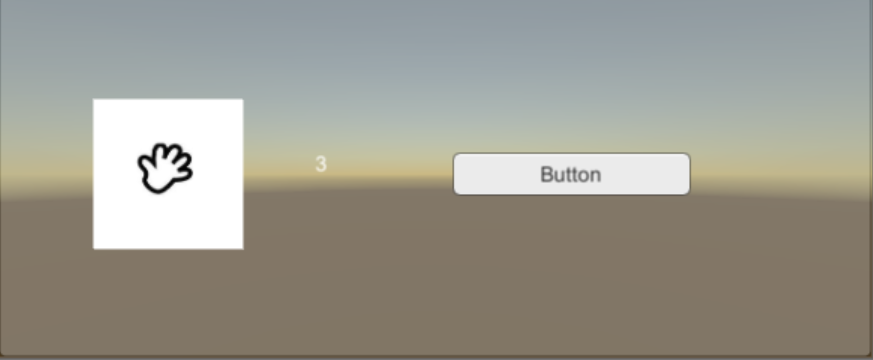
隨機產生-猜拳遊戲

using UnityEngine;
using System.Collections;
using UnityEngine.UI;
public class NewBehaviourScript : MonoBehaviour
{
    // Use this for initialization
    void Start()
    {
    }
    // Update is called once per frame
    void Update()
    {
    }
    public void myfun()
    {
        int num = Random.Range(1, 4);
        Text mytxt = GameObject.Find("Canvas/Panel/Text").GetComponent<Text>();
        mytxt.text = num.ToString();
        Image Imgy = GameObject.Find("Canvas/Panel/Image").GetComponent<Image>();
        Imgy.sprite = Resources.Load<Sprite>("Image/" + num) as Sprite;
    }
}